


jerrygoodman
Member++
-
Joined
-
Last visited
Everything posted by jerrygoodman
-
Got Sho, Gregole, and Ramotith today. Have to say, they look amazing!
-
Picked up three of them to start off. Can't wait 'til they get here!
-
New trailer!
-
Even if they didn't mention it specifically, I hope that it's a sign that the manga will get rolling again...
-
Spotted this today!

-
PART 6 IS UP!!!!
-
Almost time...
-
"Praise to the glorious leaders"? Yeeaaaah, I have some guys who might disagree with that.
-
Currently looking at Zom 100: Bucket List of the Dead, along with Beck Mongolian Chop Squad.
-
This one is something I can't quite get out of my head... Tyrone Johnson and Tandy Bowen, better known as Cloak and Dagger. I know this may seem like an unusual pair of candidates to pit against Archanfel but hear me out for a second... Cloak's body is a portal to the Darkforce Dimension, a world of strange ebony energy. Cloak is linked to a pocket realm of that dimension dominated by the Predator, which compels Cloak to absorb the life forces of other beings; but Dagger's light can temporarily satisfy this craving. Also, I was re-reading Infinity Gauntlet #4, where a group of Earth's heroes attempt to attack Thanos. Cloak was one of those heroes assembled, and tried to trap Thanos within his cape. Obviously it didn't work, but Thanos had the advantage of the Infinity Gems at the time. I was wondering, though, would Tyrone be able to entrap Archanfel? Conversely, let's talk about Dagger for a moment... Tandy's abilities stem from a form of energy called the "Lightforce" -- a force of energy that is the counterpart to the Darkforce, its opposite in every way. While the Darkforce is corruptive, Lightforce energy is cleansing, being derived from life force and capable of purging toxins, drugs, and other malignant substances, as well as curing diseases, mental instability, and criminal inhibitions. It can also be used offensively, as seen with Tandy Bowen's signature light daggers. Another thing I wanted to note is that Lightforce seems to have adverse effects on the supernatural, as seen from "Cloak & Dagger" Vol. 3, 18, when the duo, along with Spider-Man and Ghost Rider were stuck in Mephisto's realm. Makes one wonder what would happen if a zoalord would be affected by this energy... So...would Cloak and Dagger be able to give Archanfel a hard time?


-
Chronos troopers too? Oh yeah... Gonna see if I can get these guys on Etsy.
-
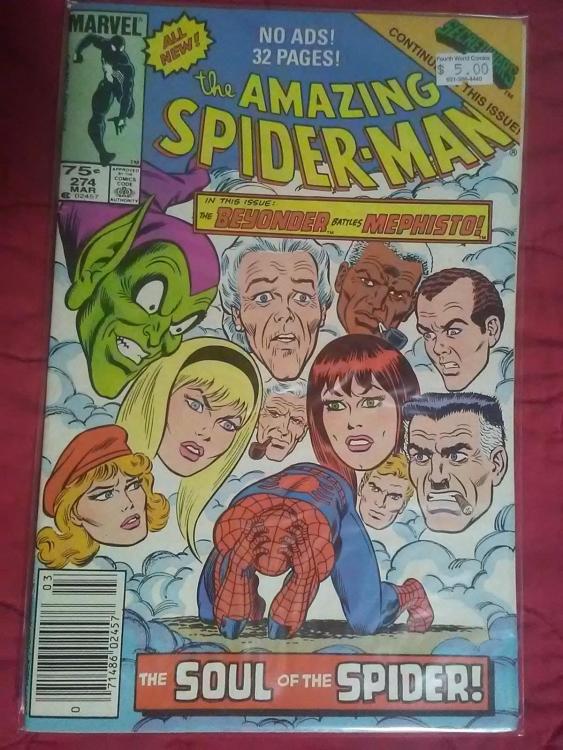
Does he mention anything about the story getting completed? Pipe dream, I know, but still...Well, being bonded to an unstable Guyver unit will do that, apparently.Oh yeah, definitely have these guys square off with my MCP figsHere's a playlist for the series, if anyone wants to check it out: https://youtube.com/playlist?list=PLK2PuRK79LlhTpEPaeqJfMS5HhCA4tC95Don't believe I do, but I may keep an eye out for them.I hope you're right, Tora. I really want to see the story get a proper conclusion.A reminder, if anyone wants to show their support for this series, here's a link to their Patreon: https://www.patreon.com/DarkOrbits (I'm already a supporter, btw. I'm trying to encourage some people to join in too)In honor of the late John Romita Sr., I added these to the collection recently...







Account
Navigation
Search
Configure browser push notifications
Chrome (Android)
- Tap the lock icon next to the address bar.
- Tap Permissions → Notifications.
- Adjust your preference.
Chrome (Desktop)
- Click the padlock icon in the address bar.
- Select Site settings.
- Find Notifications and adjust your preference.
Safari (iOS 16.4+)
- Ensure the site is installed via Add to Home Screen.
- Open Settings App → Notifications.
- Find your app name and adjust your preference.
Safari (macOS)
- Go to Safari → Preferences.
- Click the Websites tab.
- Select Notifications in the sidebar.
- Find this website and adjust your preference.
Edge (Android)
- Tap the lock icon next to the address bar.
- Tap Permissions.
- Find Notifications and adjust your preference.
Edge (Desktop)
- Click the padlock icon in the address bar.
- Click Permissions for this site.
- Find Notifications and adjust your preference.
Firefox (Android)
- Go to Settings → Site permissions.
- Tap Notifications.
- Find this site in the list and adjust your preference.
Firefox (Desktop)
- Open Firefox Settings.
- Search for Notifications.
- Find this site in the list and adjust your preference.