Skip to content
View in the app

A better way to browse. Learn more.

Japan Legend / Guyver Forum

A full-screen app on your home screen with push notifications, badges and more.

To install this app on iOS and iPadOS
  1. Tap the Share icon in Safari
  2. Scroll the menu and tap Add to Home Screen.
  3. Tap Add in the top-right corner.
To install this app on Android
  1. Tap the 3-dot menu (⋮) in the top-right corner of the browser.
  2. Tap Add to Home screen or Install app.
  3. Confirm by tapping Install.

Leaderboard

Popular Content

Showing content with the highest reputation on 03/13/2026 in all areas

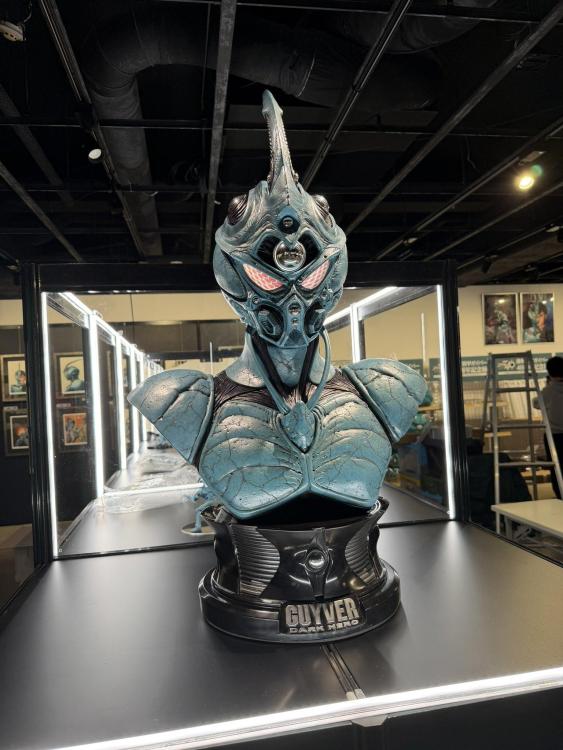
  1. Max Watanabe posted a couple images from the exhibit early as they are setting up still. Most importantly, the 1/6th Guyver 3 returns! Shame it isn't in color... But at least it's still being shown!
  2. We have gotten our first early color image release of the new Guyver 3 Figma. It still says Pending, so we're likely still around 6 or so months before we hear about a pre-order... but they could also rush this one out too... So normal routines may not apply. But they are really getting everything ready to make the new 40th anniversary event stand out.

Account

Navigation

Search

Search

Configure browser push notifications

Chrome (Android)
  1. Tap the lock icon next to the address bar.
  2. Tap Permissions → Notifications.
  3. Adjust your preference.
Chrome (Desktop)
  1. Click the padlock icon in the address bar.
  2. Select Site settings.
  3. Find Notifications and adjust your preference.