
Leaderboard
-

Matt Bellamy
Admin1Points1,477Posts
Popular Content
Showing content with the highest reputation on 08/30/2018 in all areas
-
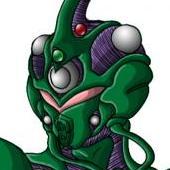
The usual breakdown of this usually goes as follows: Guyver 1 - Blank slate. Sho had no ambition/motives in life and the unit stayed its default color and gave a pretty basic design. I wouldn't say "default" as there is likely no "default" look. Guyver 2 - Lisker wanted power. He wanted to move up in the world. Yellow/Gold are usually associated with power. It has never been properly confirmed whether or not the damaged look is because of the damage to the control metal, but the alternate model head that Max factory released is also mean looking, as Lisker not a man to cross. Guyver 3 - Dark ambitions, dark armor. Even further mutated by the general malice and evil that Agito likely feels. He wants to rule and will step on any one's corpse if he has to. Despite his "good guy" status at points, when he got his unit, his ambitions were dark as they come. Guyver 2-F - She's out for revenge, but it is based somewhat on her relationship with Lisker... Purple/pink is a weird color for her, unless she has some unresolved feelings... Guyver 0 - Very likely was a hunter. Fierce and violent... But not evil. Probably a hunter of a tribe and very brave. Green is often considered the color of bravery. So he has a mean look, but not an evil color.1 point