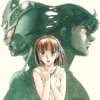
August 29, 201016 yr I tried my hand at coloring some Guyver manga panels with Gimp. I never really tried coloring the manga too much before and don't really know much at all about the software. I didn't color Mizuki's hair in these, I thought it looked like a pretty daunting task and I didn't think I would be able to color all the strands of hair. Feel free to comment.
August 29, 201016 yr Not bad dude. Next try experimenting with some shadow-play that way you can add another dimension of realism to your colored images
August 29, 201016 yr Author Not bad dude. Next try experimenting with some shadow-play that way you can add another dimension of realism to your colored images Thanks BannaKing, The best way to do that would be to experiment with the colors, correct?
August 30, 201016 yr Author What is every ones opinion. When I attempt to color manga images should I stick to the official colors if they appeared in the manga or just try and do my on thing coloring wise? Opinions would be appreciated. Thanks.
August 30, 201016 yr If you're going through the trouble of coloring the images, might as well go the extra mile and take your own spin on it and show your creativity. We all know what color the gigantic is, but how do YOU color the gigantic? And shadows are created by taking shades of the selected color and experimenting with them. Example: human skin is a tint of yellow-orange. To create realistic human shadow ontop of skin, you'd need a shade of yellow-orange. For those who didn't take color theory class, a tint is any color mixed with white, a shade is any color mixed with black. For completion sake, a tone is any color mixed with grey. That is your color theory lesson for the day.
August 30, 201016 yr Author If you're going through the trouble of coloring the images, might as well go the extra mile and take your own spin on it and show your creativity. We all know what color the gigantic is, but how do YOU color the gigantic? And shadows are created by taking shades of the selected color and experimenting with them. Example: human skin is a tint of yellow-orange. To create realistic human shadow ontop of skin, you'd need a shade of yellow-orange. For those who didn't take color theory class, a tint is any color mixed with white, a shade is any color mixed with black. For completion sake, a tone is any color mixed with grey. That is your color theory lesson for the day. Thanks for your opinion BannaKing and your advice. I colored on a bunch of manga images today and I did them close to official colors so I may go back and play with the coloring and do my own spin in them.
August 31, 201016 yr Very classy job, Primex. As for what to do next, all up to you. I like what you're doing and would like to see you take it further. Go crazy !
August 31, 201016 yr Author Very classy job, Primex. As for what to do next, all up to you. I like what you're doing and would like to see you take it further. Go crazy ! Why thank you symbol. I did a bunch more and messing around with the software I think I fond a better flesh tone.
September 1, 201016 yr you've made a very good start I like your sense of adventure, I look forward to seeing how you improve and your adventurous choice of colours.
September 1, 201016 yr Author you've made a very good start I like your sense of adventure, I look forward to seeing how you improve and your adventurous choice of colours. Thanks Ryuki, I decided I would just do my own thing on the colors. That why I decided to give Gigantic Guyver the same color that I gave to Guyver 1.

Join the conversation
You can post now and register later. If you have an account, sign in now to post with your account.