Skip to content
View in the app

A better way to browse. Learn more.

Japan Legend / Guyver Forum

A full-screen app on your home screen with push notifications, badges and more.

To install this app on iOS and iPadOS
  1. Tap the Share icon in Safari
  2. Scroll the menu and tap Add to Home Screen.
  3. Tap Add in the top-right corner.
To install this app on Android
  1. Tap the 3-dot menu (⋮) in the top-right corner of the browser.
  2. Tap Add to Home screen or Install app.
  3. Confirm by tapping Install.

Leaderboard

Popular Content

Showing content with the highest reputation on 11/17/2014 in Posts

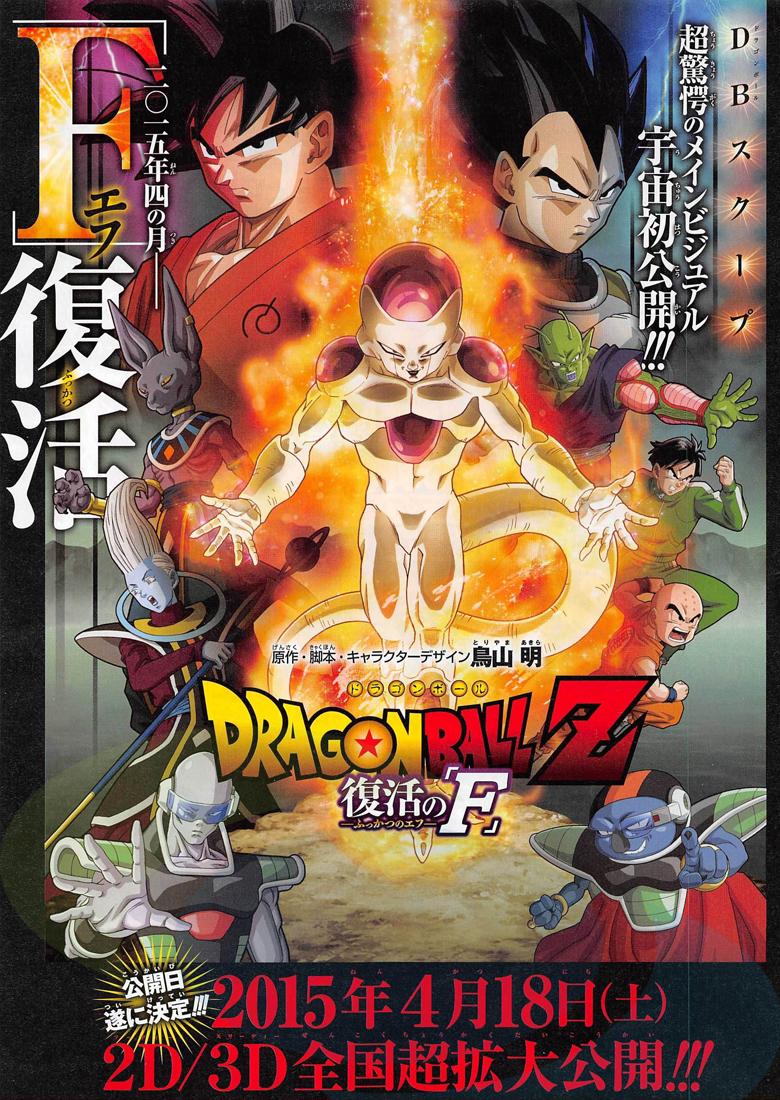
  1. The movie's title has been revealed as well as the poster and the name is DRAGON BALL Z : THE REVIVAL OF F so the horrible person who is getting revived is DUN..DUN..DUUUUUUUUN!!! FREEZA!! awesome......wait what?! from the looks of the poster it looks like that this is after battle of gods so how is Freeza going to be a threat I have no idea, maybe he is a distraction for the real threat who may be God Level.
Account

Navigation

Search

Search

Configure browser push notifications

Chrome (Android)
  1. Tap the lock icon next to the address bar.
  2. Tap Permissions → Notifications.
  3. Adjust your preference.
Chrome (Desktop)
  1. Click the padlock icon in the address bar.
  2. Select Site settings.
  3. Find Notifications and adjust your preference.